

 USA
USA  Poland
  Spain
Spain  Malaysia
  Russia
  Japan
Japan
How to delete your app account
You can delete your account within the X1000 app
The account deletion operation is irreversible, and even if you accidentally delete it, we cannot undo this operation.
1. Open the X1000 App
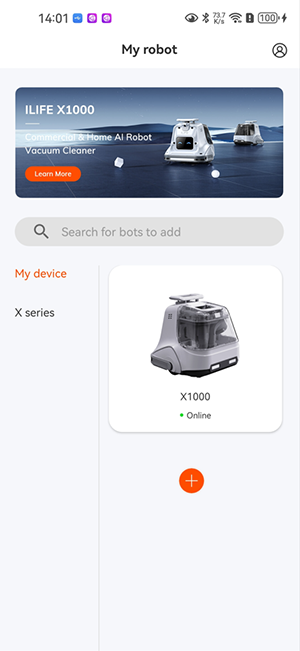
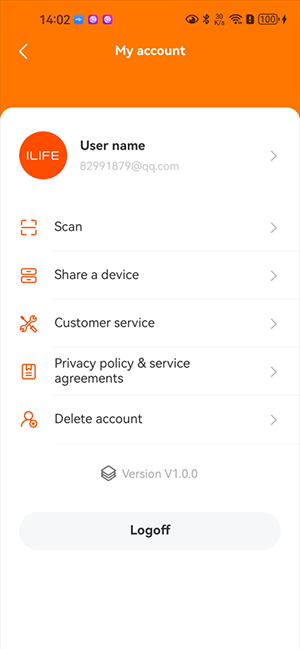
2. Click on Personal Center > Delete Account
3. Confirm the deletion of the account
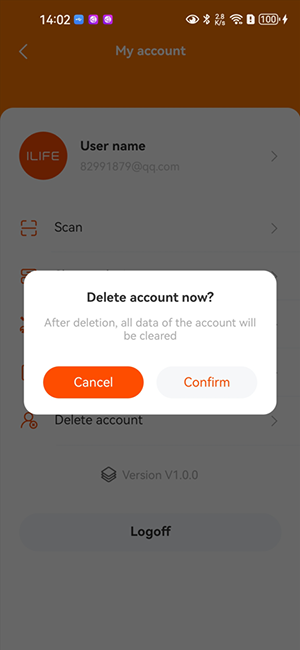
Deleting your account will
1. Unbind the machines within the account
2. Delete machine data
The account deletion operation is irreversible, and even if you accidentally delete it, we cannot undo this operation.
1. Open the X1000 App
2. Click on Personal Center > Delete Account
3. Confirm the deletion of the account
Deleting your account will
1. Unbind the machines within the account
2. Delete machine data